
Swift for Android: A First Glance
TL;DR
- Swift 6.3 ships an official Android SDK.
- Java interop runs over JNI; FFM is not supported on Android.
- The tooling generates the bridge code for you.
- Java-to-Swift is the default; Swift-to-Java callbacks are opt-in.
- KMP has been stable since 2023; the Swift Android SDK shipped in 2026.
- No UI layer.
- IMHO, not production-ready yet.
Swift 6.3 ships with an official Android SDK. This post walks through what that enables, the tooling around it, the bridge to Java, and where the whole thing stands today.
History
- 2014: Swift released by Apple, initially as the new language for iOS and macOS.
- 2016: Kotlin arrives on Android as a JetBrains-built JVM language. Google declares it a first-class Android language in 2017.
- 2023: Kotlin Multiplatform1 reaches stable, allowing Kotlin code to be shared across iOS, Android, and the JVM.
- 2024:
swift-javais announced, originally aimed at calling Java from Swift on the server JVM. - 2026: Swift 6.3 ships with the official Android SDK, and the same
swift-javatooling becomes the bridge to Android.
Why Android at all?
Mobile teams routinely build the same feature twice: once in Swift for iOS, once in Kotlin for Android. The business logic gets duplicated across two codebases and often diverges over time.
The wish for shared code is older than mobile itself. Stakeholders want consistency and lower cost. Engineers want a single source of truth for the parts of the app that have nothing to do with the UI. The existing answers are Kotlin Multiplatform, Flutter, and React Native, each making a different trade-off between shared logic, shared UI, and platform fidelity.
Swift on Android adds another answer, but a narrow one. There is no shared UI layer. The realistic target is headless code: a Swift library that holds business logic, dropped into an Android app as a native shared library and called from Kotlin.
What you need
The Swift project documents two sides of the workflow: cross-compiling on a host machine, and deploying to Android.
For cross-compilation you need three things on a macOS or Linux host: the Swift toolchain (the official getting-started guide uses 6.3.2), the Swift SDK for Android (a separate bundle of Swift libraries, headers, and configuration that extends the toolchain), and the Android NDK2 in LTS version 27d or later. The getting-started guide targets Android API level 28, with target triples like aarch64-unknown-linux-android28 and x86_64-unknown-linux-android28.
To run the resulting binary, you need either a physical Android device with USB debugging enabled or a locally-running Android emulator (typically installed via Android Studio). adb3 handles the deployment and lets you stream logs.
See the Swift SDK for Android getting-started guide for the canonical instructions.
Bridging Swift and Java
Why JNI instead of FFM
JNI is how the JVM talks to native code: a Java method is bound to a C-style symbol exported by a native library.
FFM, the Foreign Function and Memory API, is the modern replacement. The name reflects that it covers two concerns: calling foreign functions, and safely accessing memory that the JVM does not own. Compared to JNI it is less brittle, gives Java a typed view of native memory, and needs no hand-written C glue on the Java side.
On a backend or desktop JVM, FFM is the way to go. The Android Runtime4 does not implement it, so JNI remains the only option on Android. This is why swift-java’s Android output uses --mode=jni while the server JVM target uses --mode=ffm.
What swift-java is
swift-java is the umbrella project that provides the bridge. It started as a Swift Server Workgroup effort for Swift-to-Java interop on the JVM and now doubles as the Swift-on-Android bridge: the swift-android-examples repository uses it for every example that calls Swift from Kotlin.
It supports two modes:
--mode=jnifor Android, since the Android Runtime has no FFM.--mode=ffmfor a backend or desktop JVM that does have it.
Everything below assumes the Android case, so --mode=jni.
Calling Java from Swift
Manual JNI
You write a Swift function with @_cdecl and a mangled name matching what JNI expects, declare a native method on the Java side, and let System.loadLibrary pull in the .so at runtime. A raw-JNI example shows this end-to-end. You own everything: symbol names, JNI marshalling, lifetime.
Annotation-driven via swift-java
Instead of writing the bridge by hand, you annotate your Swift code and let swift-java generate both sides of the bridge. Five annotations cover the common cases:
@JavaClassdeclares that a Swift type mirrors a Java class.@JavaMethodexposes a Java instance method to Swift.@JavaStaticMethodexposes a Java static method to Swift.@JavaFieldexposes a Java field to Swift.@JavaImplementationprovides the Swift body of a method declared on the Java side.
Protocol-based callbacks
A second variant skips the annotations entirely: a Swift protocol becomes a Java interface that Kotlin or Java can implement, and instances can be passed back into Swift. No @Java* annotations needed; the protocol declaration alone is enough. See Swift calling Java back for the full treatment.
swift-java tooling
You do not install or invoke the codegen tools directly. swift-java is added as a Swift Package dependency, ships a SwiftPM build plugin (JExtractSwiftPlugin) that runs the generators during swift build, and provides a runtime library (SwiftJava) that the Swift target links against. The hashing-lib example in swift-android-examples, a small Swift package exposing a SHA-256 hash function (examined in detail further down), wires this up in its Package.swift:
dependencies: [
  .package(url: "https://github.com/swiftlang/swift-java", from: "0.1.2"),
],
targets: [
  .target(
    name: "SwiftHashing",
    dependencies: [.product(name: "SwiftJava", package: "swift-java")],
    plugins: [.plugin(name: "JExtractSwiftPlugin", package: "swift-java")]
  ),
]
The Java side gets a matching runtime artifact (org.swift.swiftkit:swiftkit-core), pulled in as a regular Gradle dependency on the Android module.
Internally, three code generators are involved:
swift-javaproduces the Swift@_cdeclbridge.jextract-swiftproduces the Java native wrapper.--mode=jnifor Android,--mode=ffmfor the server JVM.wrap-javaproduces Swift wrappers for Java APIs.
Pipeline integration
On the Swift side, a single swift build is enough: the plugin produces both the bridge file and the tree of generated Java wrapper classes as part of the normal build.
On the Android side, a Gradle module ties the Swift output into the app build. It cross-compiles the Swift package once per supported Android architecture, places each resulting shared library in the standard jniLibs/ folder, and folds the generated Java wrappers into the Android source set. The hashing-lib example demonstrates this end-to-end, with the Swift runtime libraries (swiftCore, swift_Concurrency, Foundation, dispatch, and a handful more) copied alongside the application code. The final output is a standard Android .aar that the consuming app picks up as a local dependency.
The Swift runtime has to ship with the APK because Android does not provide one. If the Swift code pulls in a module like Observation, the corresponding libswiftObservation.so has to be added to the Gradle library list explicitly; otherwise the app crashes at startup with an UnsatisfiedLinkError.
Manual vs pipeline
Nothing the SwiftPM plugin and the Gradle script do is magic. They automate exactly the manual JNI workflow shown in the raw-JNI example. The plugin emits the same shape of @_cdecl Swift functions and native Java declarations you would write by hand, just consistently and without the symbol-mangling busywork.
A concrete example: hashing-lib
Build flow
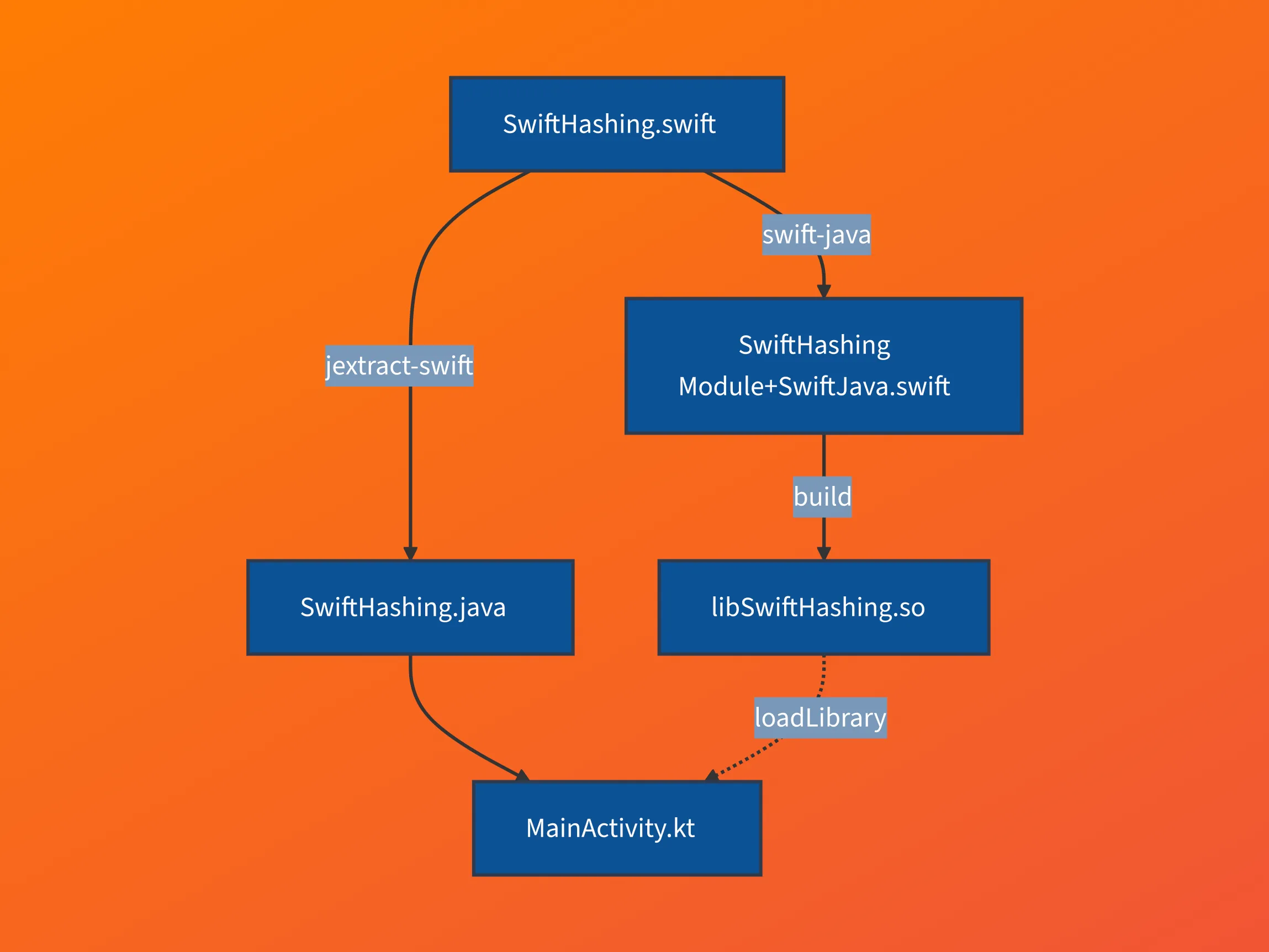
The pipeline produces three artifacts from one Swift source file:
swift-javareadsSwiftHashing.swiftand writesSwiftHashingModule+SwiftJava.swift, the@_cdeclbridge.jextract-swiftreads the sameSwiftHashing.swiftand writesSwiftHashing.java, the Java wrapper.swift buildcompiles the bridge intolibSwiftHashing.so.
On the Android side, MainActivity.kt consumes SwiftHashing.java directly and loads libSwiftHashing.so through System.loadLibrary.
Swift code
The library itself is one function that hashes a string with SHA-256. The conditional import is worth noting: FoundationEssentials is a lighter, ICU-free Foundation re-implementation that the code prefers when available, falling back to full Foundation otherwise. The pattern keeps the library portable across Apple, Linux server, and Android targets.
// Sources/SwiftHashing/SwiftHashing.swift
import Crypto
#if canImport(FoundationEssentials)
import FoundationEssentials
#else
import Foundation
#endif

public func hash(_ input: String) -> String {
    return SHA256.hash(data: Data(input.utf8)).description
}
Generated Swift bridge
This is the bridge file that makes the Swift function visible to JNI. swift-java generates it from the source above, with a symbol name encoded the way JNI expects, so you do not write it by hand:
// .build/plugins/outputs/.../JExtractSwiftPlugin/Sources/SwiftHashingModule+SwiftJava.swift
@_cdecl("Java_com_example_swifthashing_SwiftHashing__00024hash__Ljava_lang_String_2")
public func Java_com_example_swifthashing_SwiftHashing__00024hash__Ljava_lang_String_2(
  environment: UnsafeMutablePointer<JNIEnv?>!, thisClass: jclass, input: jstring?
) -> jstring? {
  return SwiftHashing.hash(String(fromJNI: input, in: environment))
    .getJNILocalRefValue(in: environment)
}
About @_cdecl
The @_cdecl attribute is not new. It has been the de-facto way for years to expose Swift functions to C code, for example when embedding Swift in a C or Objective-C project, though it remains an underscored, unofficial Swift attribute. It exports a Swift function under a fixed C-compatible symbol name instead of Swift’s default mangled one. That fixed name is exactly what JNI’s resolution mechanism looks for: it encodes the Java package, class, and method that should resolve to this function.
Generated Java wrapper
The matching Java class loads the native library on first access and exposes a public hash method that forwards to the JNI-bound private $hash:
// .build/plugins/outputs/.../JExtractSwiftPlugin/src/generated/java/com/example/swifthashing/SwiftHashing.java
public final class SwiftHashing {
  static final String LIB_NAME = "SwiftHashing";

  // loads libSwiftHashing.so when the class is accessed
  static {
    System.loadLibrary(SwiftLibraries.LIB_NAME_SWIFT_JAVA);
    System.loadLibrary(LIB_NAME);
  }

  // friendly API for Kotlin/Java
  public static java.lang.String hash(java.lang.String input) {
    return SwiftHashing.$hash(input);
  }

  // JNI binding to the @_cdecl stub
  private static native java.lang.String $hash(java.lang.String input);
}
Usage
From the Android side, calling Swift looks like any Kotlin method call:
// src/main/java/com/example/hashingapp/MainActivity.kt
Button(
    colors = ButtonDefaults.buttonColors(
        containerColor = Color(0xFFF05138),
        contentColor = Color.White
    ),
    onClick = {
        // This calls the Swift method `hash` from SwiftHashing.swift
        hashResult.value = SwiftHashing.hash(input.value)
    }
) {
    Text("Hash")
}
Swift calling Java back
In the swift-java-weather-app example, the Swift WeatherClient is initialised with a LocationFetcher protocol. On iOS this protocol would be backed by CLLocationManager; on Android, swift-java lets a Java class implement the same protocol and pass the implementation back to Swift. The Swift call to the protocol method then crosses JNI in the opposite direction and lands in the Java implementation.
On the Android side, the implementation is a regular Kotlin class that implements the generated LocationFetcher interface:
// src/main/java/com/example/weatherapp/services/LocationService.kt
class LocationService(private val context: Context) : LocationFetcher {
    private val arena = SwiftArena.ofAuto()

    override fun currentLocation(`swiftArena$`: SwiftArena?): Location {
        // ... fetch Android location via FusedLocationProviderClient ...
        return Location.init(
            androidLocation.latitude,
            androidLocation.longitude,
            arena
        )
    }
}
The swiftArena$ parameter is injected by the codegen: the returned Location is a Swift value, so the Java side needs an arena to allocate it into.
Because reverse calls add memory and thread-lifecycle complexity (Swift’s ARC5 and the JVM’s garbage collector have to agree on when the bridged objects die), the feature is opt-in. You enable it in the package’s swift-java.config:
// Sources/WeatherLibrary/swift-java.config
{
  "javaPackage": "com.example.weatherlib",
  "mode": "jni",
  "enableJavaCallbacks": true
}
The lifetime management this enables is handled through SwiftArena, covered next.
SwiftArena
Calling Swift from Java means Swift objects live on the JVM side of the boundary, and Swift uses ARC where the JVM uses a garbage collector. The two models do not co-operate automatically. SwiftArena (in org.swift.swiftkit.core) is swift-java’s answer: an explicit lifetime region that owns the Swift-side memory of every Swift object that crosses into Java. Closing the arena, explicitly or automatically through SwiftArena.ofAuto(), releases the tracked objects.
This costs more than it does in pure Swift, especially for value types. A struct normally lives inline and gets copied on assignment; the boundary changes that, because the Java side needs a stable handle, so swift-java heap-allocates the struct and pins its lifetime to an arena. Classes don’t pay extra heap allocation, since their instances were already on the heap. Structs do: the boundary forces them out of their inline storage. The weather example shows this pattern: a Swift struct Location becomes a Java final class Location that holds a pointer to the Swift-side storage and registers with a SwiftArena.
The arena shows up in every generated constructor and method signature, so the lifetime is visible at every call site:
// src/main/java/com/example/weatherapp/viewmodel/WeatherViewModel.kt
class WeatherViewModel : ViewModel() {
    private val arena = SwiftArena.ofAuto()

    fun fetchWeather() {
        val client = WeatherClient.init(locationService, arena)
        val weather = client.getWeather(arena).await()
    }
}
On Android, SwiftArena.ofAuto() is the natural choice because Jetpack Compose’s ViewModel already owns the lifecycle: the arena lives as a field on the view model, and once the view model is cleared and garbage-collected, the auto-managed arena tears itself down and frees the Swift objects with it.
Swift for Android vs. KMP on iOS
The two technologies approach the problem from opposite ends. KMP keeps the shared code in Kotlin and runs it as a native framework on iOS, with the iOS side calling into JetBrains-generated Swift bindings. Swift for Android does the reverse: the shared code stays in Swift, gets compiled to a native .so, and is called from Kotlin or Java through swift-java’s generated bridge.
| Swift for Android | KMP on iOS | |
|---|---|---|
| Memory management | ARC5 | Kotlin/Native garbage collector |
| Native artifact | .so via LLVM6 | .framework via LLVM |
| Stability | SDK since March 2026 | Stable since November 2023 |
| UI | No UI layer | Compose Multiplatform |
Limitations
Known constraints as of Swift 6.3:
- No UI layer. SwiftUI and UIKit are not available on Android. The Android Workgroup is focused on business logic first; UI options are deferred.
- No FFM on Android. The Android Runtime does not implement FFM, so JNI is the only interop path.
swift-javais pre-1.0. Java-to-Swift callbacks are opt-in viaSwiftArena, and the public surface is still moving.
When would I use this?
The realistic use case today is sharing business logic between iOS and Android. The Swift module is dropped into the Android app as a native library and called from Kotlin.
What this is not yet suitable for:
- A complete cross-platform app, since no UI framework is available on Android.
- Performance-sensitive paths with frequent crossings, since each call pays JNI overhead. The same applies to KMP and other cross-language sharing approaches.
- Production code where toolchain stability matters more than the shared codebase, given how new the official SDK is.
Conclusion & Outlook
In my humble opinion, it is not production-ready yet.
What is worth watching over the next releases:
- How much of Foundation lands on Android and how stable the SDK distribution becomes.
- Whether
swift-javamoves towards a 1.0 with a stable surface. - Whether Apple takes a more visible position on Swift beyond Apple platforms.
For now, this is interesting enough to prototype with, and not stable enough to bet a shipping product on.
This post is the written version of the short talk I gave at the CocoaHeads Cologne relaunch in April 2026.
Sources
swift-android-examples, the official examples repository.- Swift SDK for Android: getting-started guide.
- Announcing the Swift SDK for Android on the swift.org blog.
- Exploring the Swift SDK for Android, a follow-up post with more depth.
- Announcing the Android Workgroup on the Swift Forums, including the scope and roadmap statements.
Footnotes
-
KMP — Kotlin Multiplatform: JetBrains’ technology for sharing Kotlin code across platforms, including iOS, Android, and the JVM. ↩
-
NDK — Android Native Development Kit: the toolchain that Android uses to build native code. It provides the C standard library, the linker, and the sysroot that Swift’s Android SDK targets. ↩
-
adb — Android Debug Bridge: a command-line tool that communicates with a connected Android device or emulator, used to install apps and stream logs. ↩
-
ART — Android Runtime: the managed runtime that executes Android apps. It replaced Dalvik in Android 5.0. ↩
-
ARC — Automatic Reference Counting: Swift’s memory management model. The compiler inserts retain and release calls at compile time, instead of relying on a garbage collector at runtime. ↩ ↩2
-
LLVM: a compiler infrastructure. Both the Swift compiler and the Kotlin/Native compiler use it as their backend to produce native code. ↩